Cancel My Inventory Subscription
Published by Tatsuhiko Koyama on 2025-08-19Uncover the ways Tatsuhiko Koyama (the company) bills you and cancel your My Inventory subscription.
🚨 Guide to Canceling My Inventory 👇
Note before cancelling:
- The developer of My Inventory is Tatsuhiko Koyama and all inquiries go to them.
- Always cancel subscription 24 hours before it ends.
🌐 Cancel directly via My Inventory
- 🌍 Contact My Inventory Support
- Mail My Inventory requesting that they cancel your account:
- E-Mail: wangqi03@outlook.com
- Login to your My Inventory account.
- In the menu section, look for any of these: "Billing", "Subscription", "Payment", "Manage account", "Settings".
- Click the link, then follow the prompts to cancel your subscription.
End My Inventory subscription on iPhone/iPad:
- Goto Settings » ~Your name~ » "Subscriptions".
- Click My Inventory (subscription) » Cancel
Cancel subscription on Android:
- Goto Google PlayStore » Menu » "Subscriptions"
- Click on My Inventory – Home Tracker
- Click "Cancel Subscription".
💳 Cancel My Inventory on Paypal:
- Goto Paypal.com .
- Click "Settings" » "Payments" » "Manage Automatic Payments" (in Automatic Payments dashboard).
- You'll see a list of merchants you've subscribed to.
- Click on "My Inventory" or "Tatsuhiko Koyama" to cancel.
Have a Problem with My Inventory – Home Tracker? Report Issue
About My Inventory – Home Tracker?
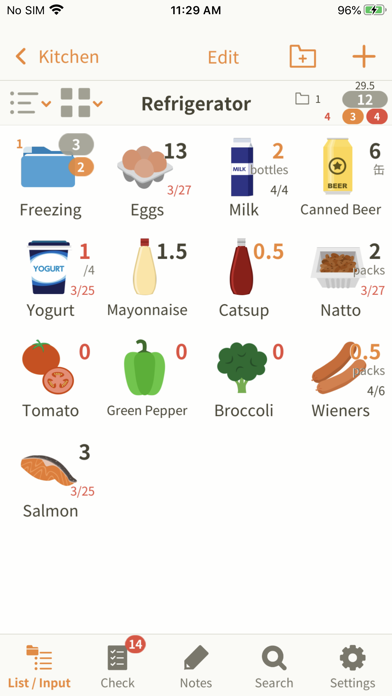
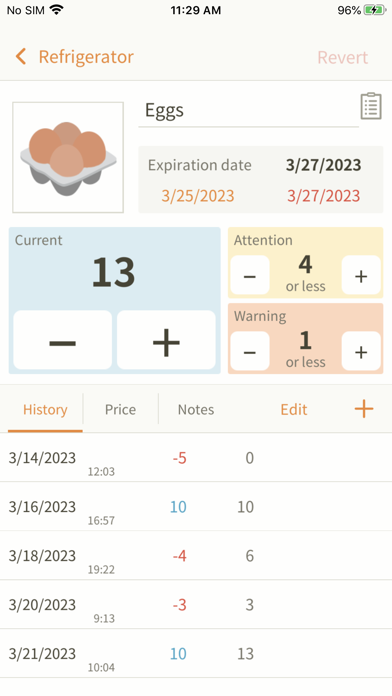
1. Enter the number of pieces or expiration date of the commodities in your fridge or kitchen storage, for example.
2. This application helps you keep track of what you have at home, so you don't need to prepare notes before going at the grocery anymore.
3. Write down whatever you want to keep in mind in the Notes field.
4. If you don't find an appropriate icon, you can take a picture and create your original icons.
5. Each item can be set to show a given number of warnings.